
Hands up if you are a Pinterest addict. There you go, I’m guessing there’s a lot of you who love Pinterest. It’s a great source for beautiful, inspirational images that users ‘pinned’ from different websites they visit, essentially creating a huge picture database.
I’ve noticed a lot of bloggers using images from Pinterest on their blogs of late. I know I have. Nothing wrong with that if you credit the image source (usually from the person who pinned the image). But with more and more of these image websites popping up (Pinterest, We Heart It, Tumblr etc), are you actually crediting the RIGHT source?
You see, when we use an image out of Pinterest, we credit the person who pinned the image. That person may not be the only person who pinned the image. That’s the point of Pinterest, isn’t it, to pin and repin images to share on social media? Ah see, when A pins an image, B repins the image, C repins the image B repinned, all the way to Z who repinned that same image … who gets the credit for the image? Z? A? What if the image was taken from Pinterest, who took it from We Heart It, who took it from Tumblr, who took it from goodness-knows-what website? Who gets the credit? Am I confusing you yet?
Or, should it be the person who created that image in the first place? Yeah, I’d say that’s about right.
This also happens when you save an image from Google. More often than not, the same images are used all over the Internet. When we use those images on our blogs, it’s convenient to just credit the first website you saw that image on. I believe that credit should be given to the person who created that image, as much as possible.
Unfortunately, with the massive amount of pictures on the Internet, it can be very difficult to trace the image right to the very person who created it. Google has made it slightly easier for you to do so.
Let’s say you would like to find the source of an image you found on the Internet. You saved the image to your computer. But where is it from? Here’s what you can do:
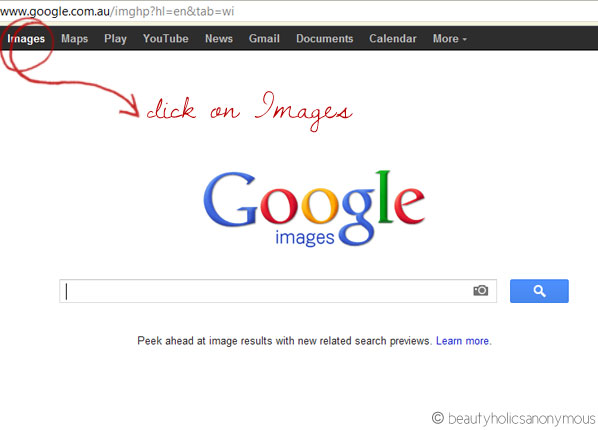
1. Do a Google Image Search. Go to www.google.com and click on Images on the top left corner of the page.
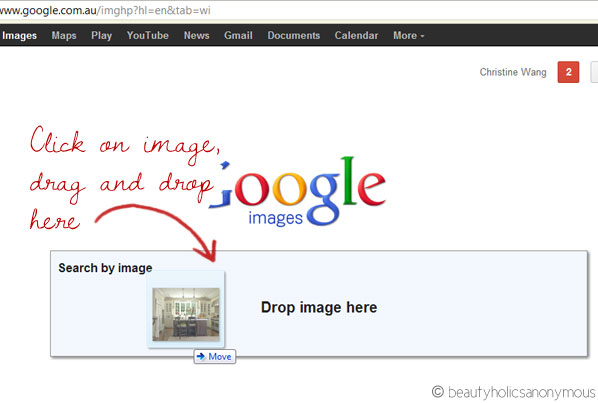
2. Click the image on your computer, drag and drop it to where the textbox is. You will notice that the textbox has changed to Search By Image.
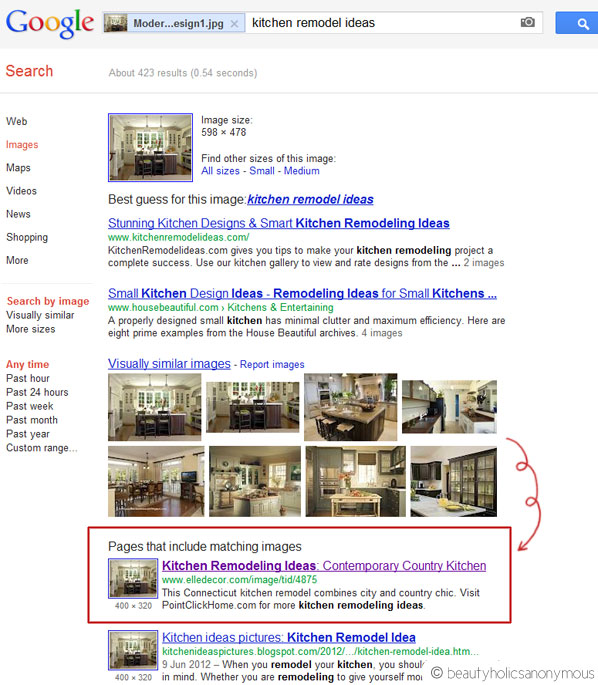
3. Next, you’ll see the search results. This is where it gets tedious. Google searches the image by its filename and metadata. If the image has been widely used, the number of results will be high and you’re going to have a field day searching for a needle in a haystack. It’s going to be difficult deciding exactly which website the original image came from.

4. For the image I’m using in this example, I have decided to credit the image to Elle Decor. It’s a well-known website for interior decorating, and most importantly, it stated the photographer of the image.
You may not be able to find the original website an image was from, but if you can find who took the image in the first place, that’s where your credit should go to, to the photographer.
Google can be a proverbial haystack for that tiny, tiny needle of an image. It may be difficult to find the source, but it’s not impossible 🙂














Awesome tips! I never knew about this feature until I read your post~
Akisa recently posted..PERIPERA Wonder of Lips – Chewing Orange #20
Akisa: I only just found out about it a few weeks ago. Had no idea Google had that feature too!
eeeep looking back i have not been doing this on any photo’s that i use that i have not take, i generally try & use my own photo’s but from now on i will most definitely make sure i am crediting the appropriate person or site. Thanks for this post lovely.
Madam M recently posted..ETUDE HOUSE – MISSING U HAND CREAM – QUEEN BEE
My pleasure, Mel. All these talk about Pinterest got me thinking, are we crediting the right person for the image, if the “pinner” pinned that image from another website? I found out about this feature on Google a few weeks ago and I thought I’d share it with you. When I started checking the source of some of the images I took, man, it really was like looking for a needle in the haystack. But some were very obvious as to where the image originally came from, which is good.
Amazing tips and I never knew you could do this either!! Actually super helpful for a little bit of work i’m doing at the moment so thanks!!
Lisa recently posted..If life was like Haute Couture….
My pleasure Lisa. I’d say, thank Google, but well, you’re welcome all the same! 😛
You know what kills me? Seeing people obediently credit images : Image Credit- Google. What the… but thanks for the Google tip. I usually take my own but its always helpful to know how one can find the source of the image if I need it 🙂
Paris B recently posted..In the case of Chanel eyeshadows, the quality of 1 Taupe Grise single far outweighs the quality of 4
Paris: *facepalm* Gee thanks. You got the image from Google? Wow I didn’t know you can get images from Google. *roll eyes*
Never knew Google had that feature, will definitely come in useful. Thanks for the tip! 😀
beetrice recently posted..July Bellabox – Taking you around the world…
Beetrice: My pleasure. I didn’t know about the feature till about a few weeks ago. Thought I’d share it with you as well 🙂
Nice! same as most comments above, I didn’t know Google had that feature too! 🙂 Thanks for sharing!
Nikki recently posted..AMW Reviews: Amazing Cosmetics AmazingConcealer
You are very welcome, Nikki 🙂
you correctly pointed it out, Tine!!! lately, I had been thinking of the same thing that I always credit the source from where I have picked the image but finding the actual source is so difficult…will try the method and let you know how successful I was 🙂
Swati recently posted..Win Nivea Sun body lotions!!! [Giveaway Open]
Yes do try it out and let me know if it works for you. It’s also a good idea to check the images on your popular posts, just to see if someone else has stolen the image for their website.
Woww, this is really really enlightening! O.O
It has actually always bothered me a little whenever I try to credit a picture cause I’m afraid I don’t credit right. Now THIS is a tip I can use. Thank you! You are awesome! 😀
China: My pleasure! It’s something I’ve noticed as well, when it came to the crediting image sources and Pinterest. It’s okay to use images found on Pinterest (what’s such an image database for if not for using, eh? :P), but best to give credit where credit is due 🙂
That’s brilliant, I will definitely be using this feature.. thank you very much for bringing it to my attention.
Omega recently posted..From LookBook to StreetLook: Celapiu and City Chic
Omega: You’re very welcome 🙂 I found out about the feature not long ago, didn’t know if people knew about it, so I thought why not share about it here? 😛
That’s awesome, thanks for sharing! I never would have known that you could do that! Xoxo
Cotton candy diva recently posted..Katy Perry Part Of Me, Cotton Candy nails, Sims 3: Sweet treats and more!
Cotton Candy Diva: It was my pleasure! 🙂
I didn’t know Google had that feature either! That’s so useful. Thanks for sharing.
gio recently posted..Product Review: Mukti Rosehip Eye Gel
Gio: You’re very welcome, Gio. Hope you get some use out of it. Good idea to check the images on your popular posts as well, to see if anyone nicked them for their websites without your permission 😉
Thanks for the awesome tip! I didn’t know about the drag and drop feature on Images. Usually I just search till my fingers ache LOL!
giddy tigress recently posted..Me-Time Luxuries: The Oil Cleansing Method
Giddy Tigress: Haha that’s exactly what I do on Google Image Search as well! I just search for images too. This is a swell feature, isn’t it? I didn’t realise we can drag and drop too until a few weeks ago 😛
How do you take all these close up photos of your eyes?
Yan: Hold camera close to the eye and snap 😛 I usually have a mirror in front of me so that I can see where the focus is at when I press the button halfway. You will need to use the macro function of your camera for this.
This is really helpful.. I didnt know you can do this with Google Search. I try to use my own pictures only, but this is definitely good to know 🙂 Im surely going to share this with my friends too!
Helz Nguyen recently posted..Exciting news – New website coming soon!
Such an important post, Tine … I find it so frustrating that so much gets pinned from Tumblr or We Heart It and the original source is lost. Another really easy way to do this is to install this button on your tool bar: http://jarred.github.com/src-img/ Whenever I’m on a page, I just click the button and it brings up a ? over each image. You just click on the image that you’re wanting to find the original source of.
Nikki @ Styling You recently posted..How to take a Selfie